Fast transcode video between different formats & codecs, upscale videos to 4K, batch-shrink video file sizes by up to 90%, edit and process videos for easier storage, playback, sharing or further creation.
|
☑ Process videos in whatever format & resolution from any source ☑ Output hundreds of formats & Codecs - MP4, MKV, H.264, HEVC, AV1... ☑ Offer high-quality codecs like ProRes, DNxHD for smooth edits. ☑ Compresses 4K/8K footage from GBs to MBs without losing quality. ☑ Support GPU-accelerated batch conversion. 30X real-time faster. |
 Screenshots ↓
  Check Specifications ↓
"I haven't come across any conversion issues using EaseFab. The image and sound are kept at a very good quality in the output videos. Very easy, fast and it supports almost all the formats!!!" - Mike (Teacher)
"It was an excellent app which i have been searching for, it does what it actually says it converts all type of video formats, it has other features too more than converting." - Dave Young (Photographer)
Support Virtually Any Video & Audio Files from Any Source
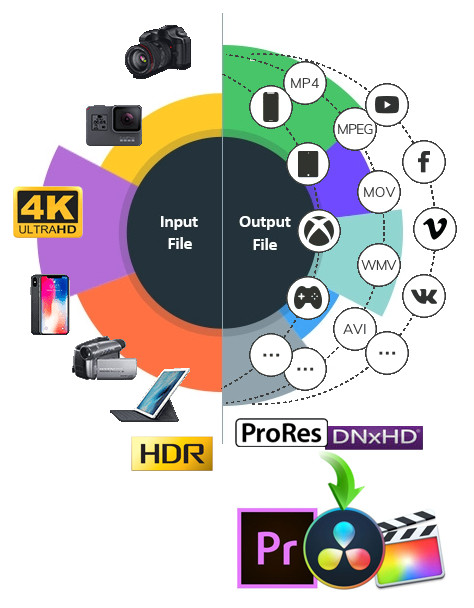
EaseFab Video Converter can read a wide range of 8K/4K/HD/HDR(10-bit)footages you shot with GoPro, DJI, Drone, iPhone, Android, camcorder, or any other 4k cameras (DSLR or mirrorless). It also works with videos downloaded online or stored in PC, tablet, USB, SSD, HDD, etc. Besides these, it also provides special support for processing M3U8 files and encrypted TiVo recordings.
 |
 |
 |
 |
 |
 |
 |
||||||
Action Cam |
Camera |
Camcorder |
Drone |
Smartphone |
Monitor Unit |
PC & Tablet |
||||||
Process UHD, 240fps, slow-mo clip from GoPro/DJI/YI. |
Smoothly support high-res uncompressed & raw footages. |
Convert video in AVCHD, DV&HDV, MXF, XAVC, XAVC S, MPEG2, MOV, etc. |
Compress huge 4K, cut long videos shot by DJI, Parrot. |
Transcode HEVC, 4K 60fps mobile videos for any devices. |
Crop and Convert 4K HEVC/H.264 videos from Monitoring system. |
Support videos stored in PC, tablet, USB, SSD, HDD, etc |
Convert Any Video to Any Format and Any Device
As an intuitive and fast converter, EaseFab Video Converter answers all simple and complicated transcoding needs. It can fast convert videos to any of your desired video formats without compromising quality.
● Multi-Format & Codec Conversion
EaseFab Video Converter can convert any common or rare videos to MP4, AVI, MKV, MOV, and over 500 other video formats, using codecs such as H.264, H.265, MPEG-4, and AV1. It can also convert your 2D video into a 3D movie with 3D SBS, 3D Anaglyph or 3D Top/Bottom modes, which is suitable for users who have VR headsets or 3D TV.
● 200+ Presets for Device & Social Media
EaseFab includes over 200 optimized preset profiles for devices from major brands like Apple, Google, Huawei, Microsoft, Samsung, Sony, LG, BlackBerry, Box, PVP, and PS. It also supports various web formats with optimized resolution and aspect ratio, ensuring your videos perform well on platforms like Instagram, TikTok, Facebook, and YouTube.
● High-Quality Codecs for Smooth Edits
As a great helper for non-linear editors, EaseFab comes with its own high-quality video codecs such as Apple ProRes, Avid DNxHD and more. These codecs are specially designed for editing and ensure maximum editing quality and efficiency when working with Adobe Premiere Pro, Avid Media Composer, DaVinci Resolve, Lightworks, etc. NLEs.
● Lossless Audio Conversion
With a variety of audio codecs, EaseFab Video Converter can convert audio formats like MP3, AMR, WAV, OGG, FLAC, and iPhone Ringtone with crystal clear Dolby Digital 5.1 channel surround sound. You can also extract audio from video and fast copy it bit-for-bit with no quality loss.
Get 30x Faster Video Conversion Speed with GPU Acceleration

EaseFab Video Converter is a super fast media converter that supports advanced CPU and GPU acceleration. It leverages multi-core CPUs and GPU engines, including NVIDIA CUDA/NVENC, AMD AMF and Intel Quick Sync Video to speed up video encoding and decoding on Windows-based computers.
The hardware acceleration can expedite video transcoding and processing up to 30X real-time faster while preserving 100% video audio quality of the original media file.
Compress 4K & Large Files in Batch without Compromising Quality
EaseFab Video Converter has powerful compressing features with easy customizable settings. It allows you to set the file size, bitrate, resolution and format before compression. You can easily compress large or oversized videos with the right size for for social media sharing, email sending, limited-storage mobile devices or other purposes.
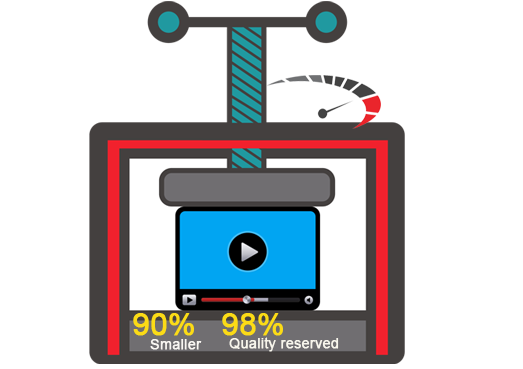
Equipped with advanced compression kernel and higher coding-efficient codecs, this tool lets you batch-shrink video file sizes by up to 90% with merely pixel-level quality difference.
Besides compressing, you can also upscale a 720p/1080p video to 4K UHD video for viewing on a 4K TV without blurry pixel block, or downscale the aspect ratio of any 4K video to 1080p or 720p to fit 2K monitor.
Make Your Videos Outstanding with the Video Editor
Various video editing functions are available in this app to assist you with creating personal videos with customized adjustments. And it takes only a few minutes for all novices to personalize your video quickly and easily with the built-in video editor including but not limited the following features.

✦ Trim and cut your video to get the part you want.
✦ Crop Video, remove black bars and customize the frame size (16:9, 4:3 etc.).
✦ Add image and text watermarks to video for copyright protection.
✦ Insert plug-in SRT, SSA, ASS subtitle to video for better illustration.
✦ Adjust brightness, contrast and saturation to enhance the visual effects.
✦ Increase volume in any video or audio file in just one click.
Besides editing, EaseFab Video Converter also allows you to merge multiple videos into one for flawless enjoyment. Moreover, you can add external subtitles (SRT format) to the video for better understanding.

Batch Conversion
Convert multiple videos in batches.

Snapshot Taking
Save your favorite video scene.

Volume Adjusting
Customize video/music volume.
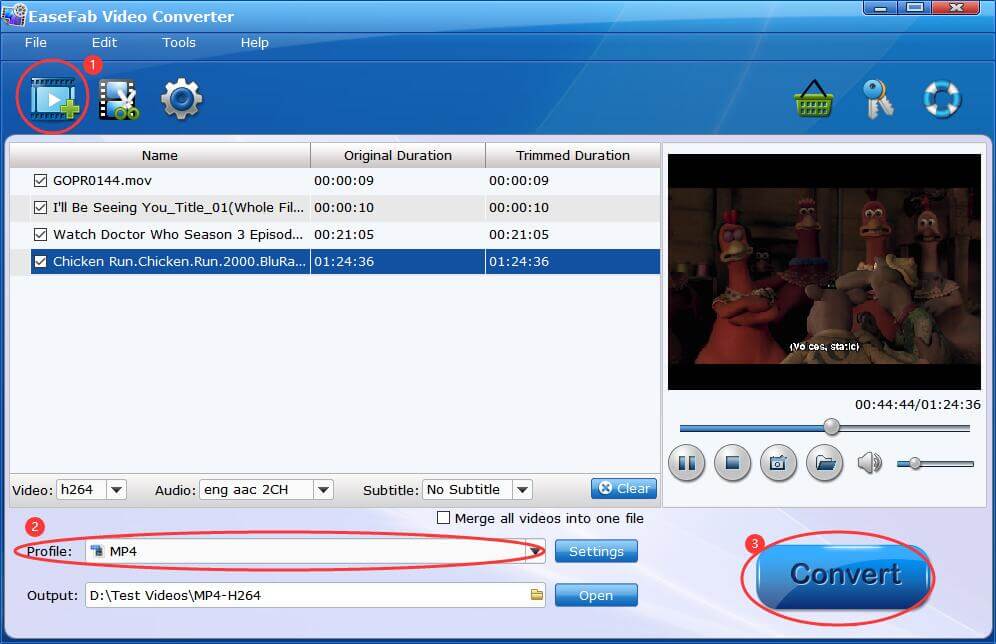
The process is straightforward as 123. All you need to do is to:
1. load video(s) into the application;
2. select the file format (or device, or service) from the profile library;
3. start the conversion.
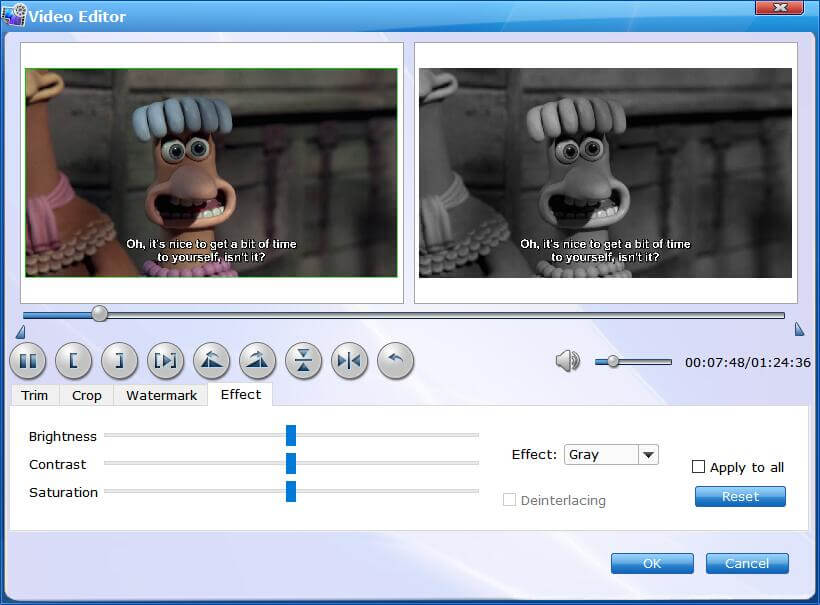
By clicking  button, you can enter Video Editor window. Here you can trim, crop, apply effects, add watermark, rotate video and much more to create captivating videos.
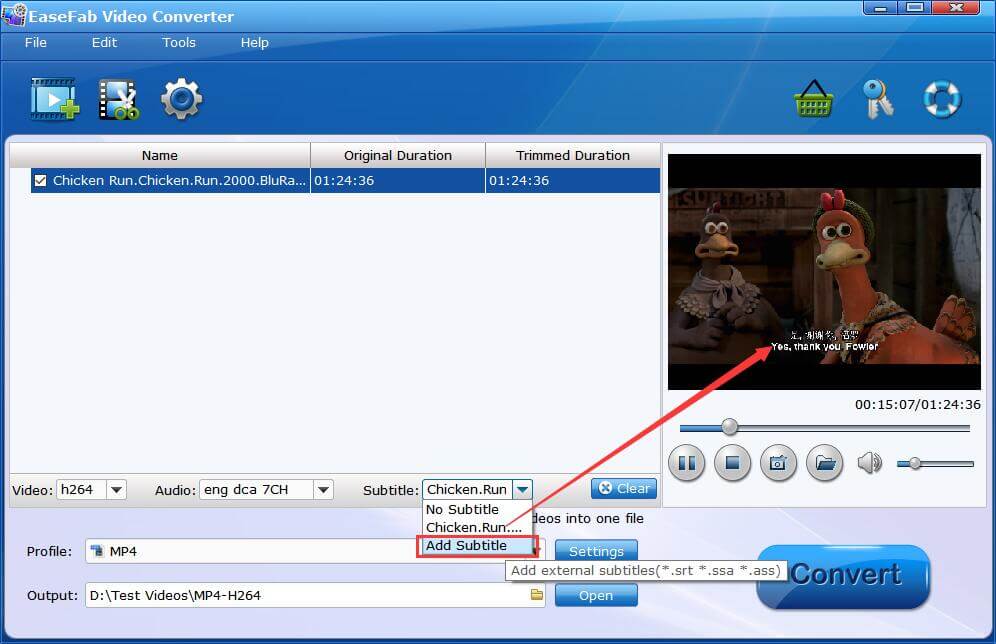
EaseFab Video Converter offers adding external subtitles formatted in srt, ssa, ass to MP4, AVI, MKV and other mainstream video formats.
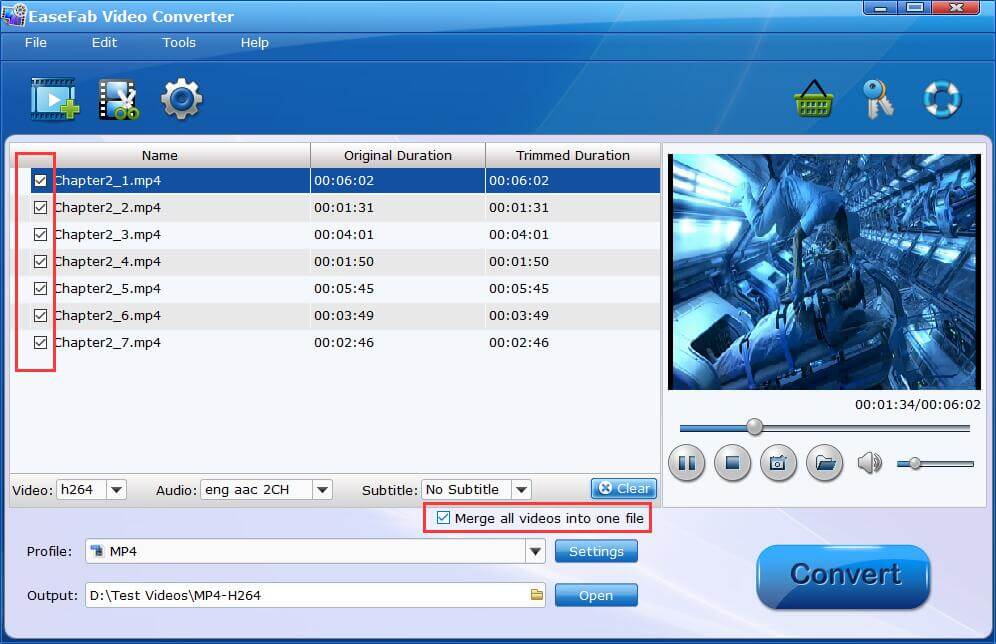
EaseFab Video Converter allows you to merge multiple videos into one. And you can easily merge entire TV series for flawless enjoyment or merge a playlist for seamless playback..
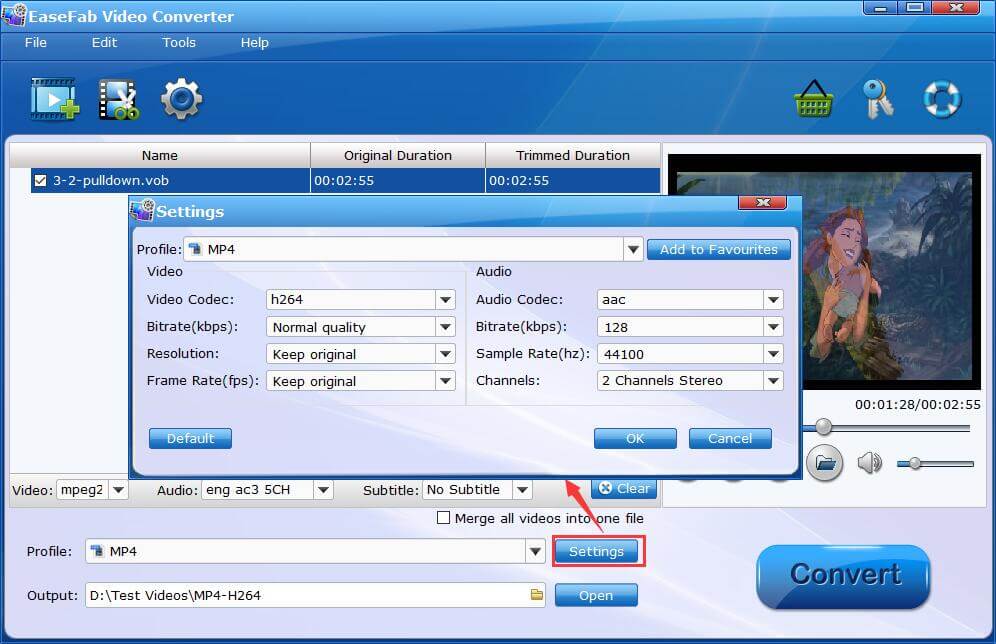
By clicking Settings button, you can enter Profile Settings window. Here you can easily adjust video and audio codec, bitrate, resolution, framerate for video conversion and compression.
System Requirements
Version Details and Pricing
 See update history >>
Copyright © 2026 EaseFab Software Corporation. All Rights Reserved.




 Sales Team: